
Today we’re launching ChartMogul AI: an analyst inside ChartMogul that investigates your data, traces metric changes back to the customers and movements behind them, and helps you understand what is happening beneath the headline numbers.
Here’s why this matters.
Subscription data is messy. Getting the logic right around upgrades, downgrades, churn, reactivations, multi-component subscriptions, refunds, credits, and currency conversion is the difference between metrics you can trust and metrics you have to keep explaining.
It’s the problem ChartMogul was built to solve. For 12 years, we’ve refined how thousands of real-world billing scenarios are translated into accurate subscription metrics.
But understanding what was behind the headline number still required curiosity, knowledge, and time. You needed to know which question to ask, which filters to apply, and how the data model worked. Then you had to spend the time following the evidence to understand what was actually behind a change.
Plenty of our customers do exactly this kind of digging. But because it takes time and skill, it tends to be reserved for high-stakes moments: a pricing change, a fundraise, a board meeting, or an important metric moving without explanation.
Day to day, it’s easier to open ChartMogul, look at your ARR, confirm it is roughly where you expected, and move on. ChartMogul AI makes that kind of investigation much easier to begin. You start by typing a question.
It won’t answer every question perfectly, and it isn’t a replacement for judgment. But it changes what a quick look at ChartMogul can tell you, from confirming the numbers to understanding what is behind them.
Not a chatbot on a dashboard
ChartMogul AI is built directly into the product, but it does more than describe the chart in front of you.
It can select the relevant metrics, build precise filters and segments, inspect the customers and movements behind a change, bring in CRM context, and summarize what it finds.
It can carry out a multi-step investigation: select the relevant metrics, construct precise filters and segments, inspect the customers and movements behind a change, bring in CRM context, and synthesize what it finds.
You can ask questions such as:
- What drove the MRR dip in March, and how much came from churn versus contraction?
- What were the main reasons customers churned last quarter?
- If the last six months of trends continued, what would ARR look like in 90 days?
- Write an executive summary of how the quarter is going so far.
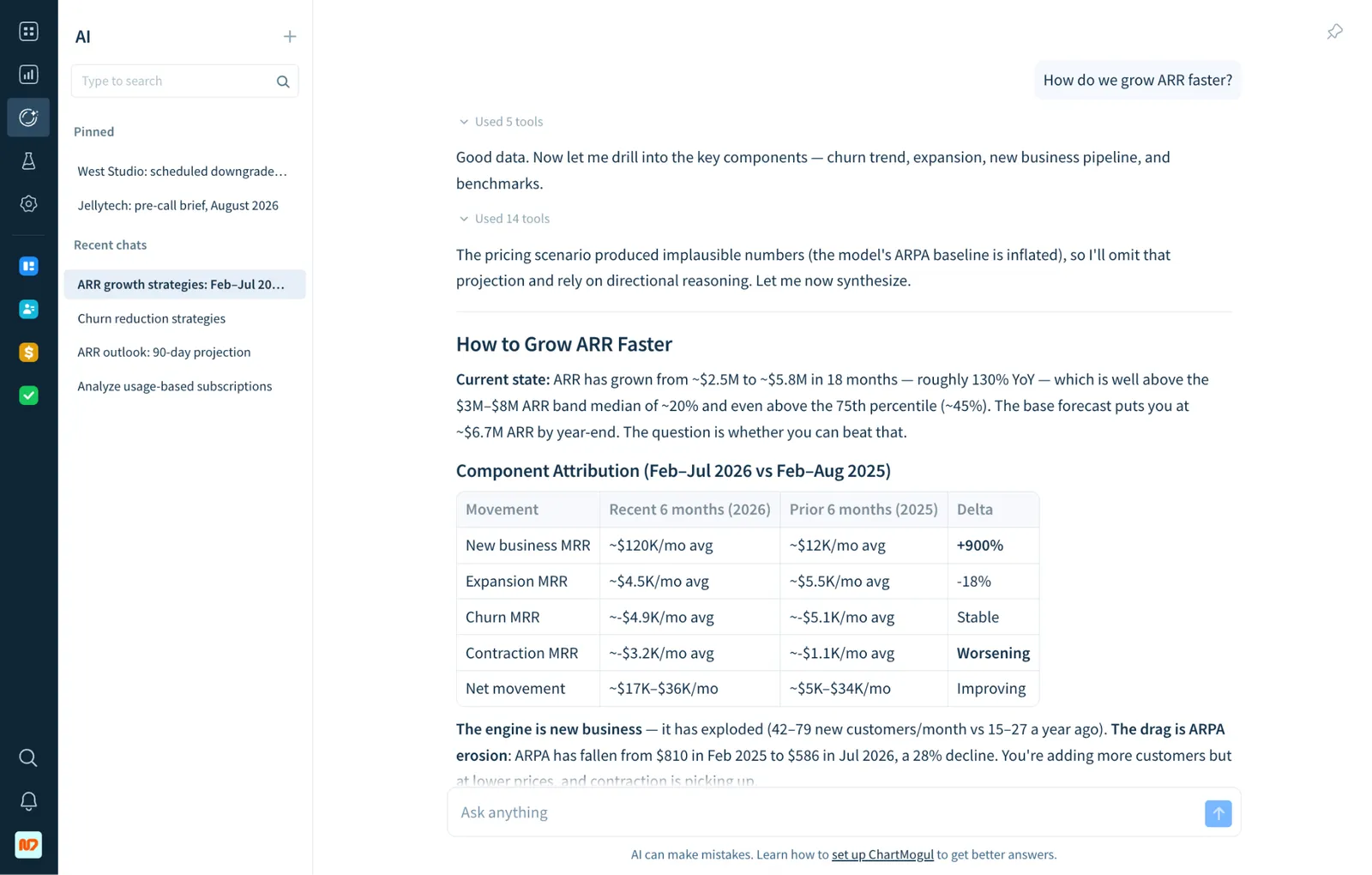
To answer questions like these, ChartMogul AI can combine revenue, customer, product usage, and CRM data in a single analysis.
That last part is particularly important. Revenue metrics can tell you what happened. Answering why often requires more context.
ChartMogul can analyze customer emails, notes, call logs, and other interactions. We preprocess this unstructured information into knowledge such as cancellation reasons, competitor mentions, sentiment, and product feedback, so that it is ready for analysis even at high data volumes.
CRM is now free for every ChartMogul user
To produce the best answers, ChartMogul AI needs the most complete possible picture of each customer. That is why, starting today, ChartMogul CRM is included as part of the core platform.
Previously, connecting your email account required a paid CRM Pro seat. We have now removed paid CRM seats entirely. Every user can connect their inbox and use the full set of CRM features, without purchasing an additional CRM seat. The more customer context ChartMogul has, the better its analysis can be.
AI that understands what you are looking at
Because ChartMogul AI is built into the product, it understands the report, segment, or customer record you are currently viewing.
We are also adding contextual AI entry points throughout the product. When you see that a customer has cancelled, one click starts an investigation into their history and the likely reasons behind the cancellation.
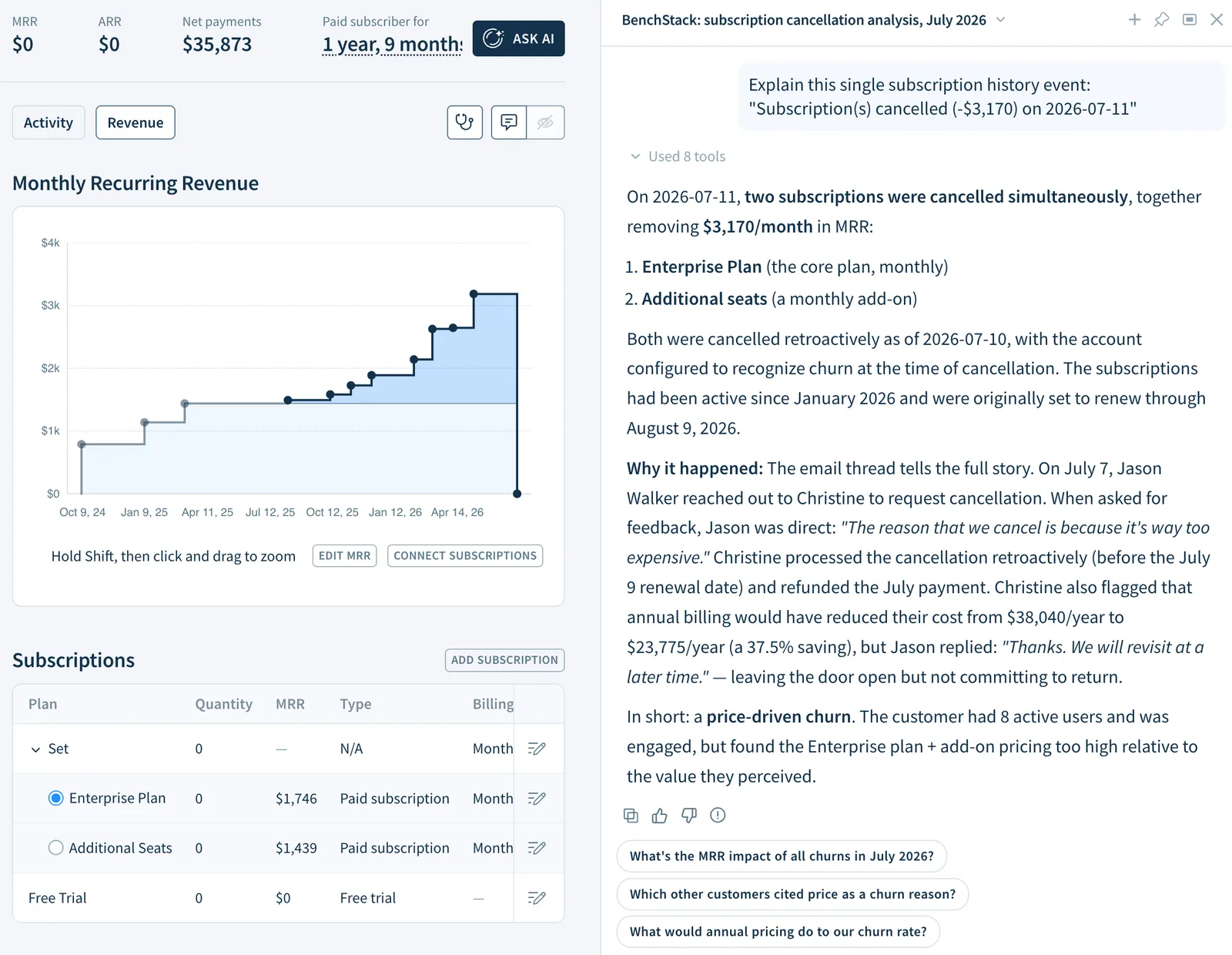
ChartMogul AI can also create complex filters and segments from natural language. A request such as “Compare ARR growth and retention across every US state.” would previously have required manually configuring many segments. Now you can simply ask.
For now, ChartMogul AI is read-only. We plan to add write actions next.
Why build this inside ChartMogul?
In June, we launched a much more extensive version of our ChartMogul MCP server, with more than 80 tools and verified listings in the Claude and ChatGPT integration directories. It gives general-purpose AI tools secure access to the same underlying ChartMogul data and tool layer used by ChartMogul AI.
MCP is particularly useful when you want to combine ChartMogul with other systems or work inside a general-purpose AI tool.
The native experience combines direct product context with methods developed specifically for subscription analytics. ChartMogul AI understands our data model, can construct precise filters using ChartMogul Filter Language (CFL), and uses detailed instructions and specialized skills to guide how it investigates and answers questions.
We currently use the latest models from Anthropic, but the underlying model is not the main difference. The advantage comes from combining trusted subscription data, native product context, and more than a decade of recurring-revenue expertise built into how the AI works.
As George, one of the engineers behind ChartMogul AI, explains:
Every part of the architecture exists because something went wrong without it. The model picked the wrong tools, so we built routing that selects the right tools for each question. It guessed filters, so filter building went to a separate small agent that first looks up your real plans and tags, then writes the filter in CFL. It investigated too shallow, so we wrote skills, step-by-step methods for specific question types. It built links to charts and customers by hand and sometimes got them wrong, so now every link comes attached to the data itself, and the model can only copy it. You don’t see any of this in the chat, but all of it is why the answers are good.
What it cannot do yet
There are also some important limitations today:
- It does not ask clarifying questions yet. When a question is ambiguous, it chooses a reasonable interpretation and proceeds.
- It has no memory yet. Each new chat starts fresh.
- It is read-only. It analyzes and explains, but it does not act.
You can learn more about its current capabilities in our Help Center documentation.
Over time, you will be able to ask ChartMogul AI to:
- Identify customers at risk of churning and create follow-up tasks for their account owners.
- Draft personalized renewal emails for customers whose contracts expire next quarter.
- Batch tag customers who require manual review based on their billing history, contract terms, or account status.
Where this goes
We are not treating ChartMogul AI as a one-off feature.
It sets the direction for where ChartMogul is heading: less a dashboard you check and more a system that helps you understand your recurring-revenue business and, increasingly, act on what it finds. Our working thesis is that AI will become the primary interface for deeper data analysis.
Charts, filters, and controls still matter. I personally love well-designed UI. But increasingly, AI can operate those controls for you, and some may eventually no longer need to be exposed at all. How far this shift goes remains to be seen, but the direction is already clear.
Available today
ChartMogul AI is available today.
Start with an unexplained metric change, a question you have been putting off, or a piece of analysis you have never quite had the time to do properly. And, as always, we would love to hear what you think.